Description
MC Skins to Pixel Art Avatars 🎨
A web-based utility that easily converts standard Minecraft skins into stylized 2D pixel art avatars. Perfect for profile pictures, forums, or fan art!
✨ Features
- Drag-and-Drop Interface: Easily upload your Minecraft skins by dropping them right into the browser.
- Format Support: Compatible with both modern (64×64) and legacy (64×32)
.pngskin files. - Multiple Styles & Poses:
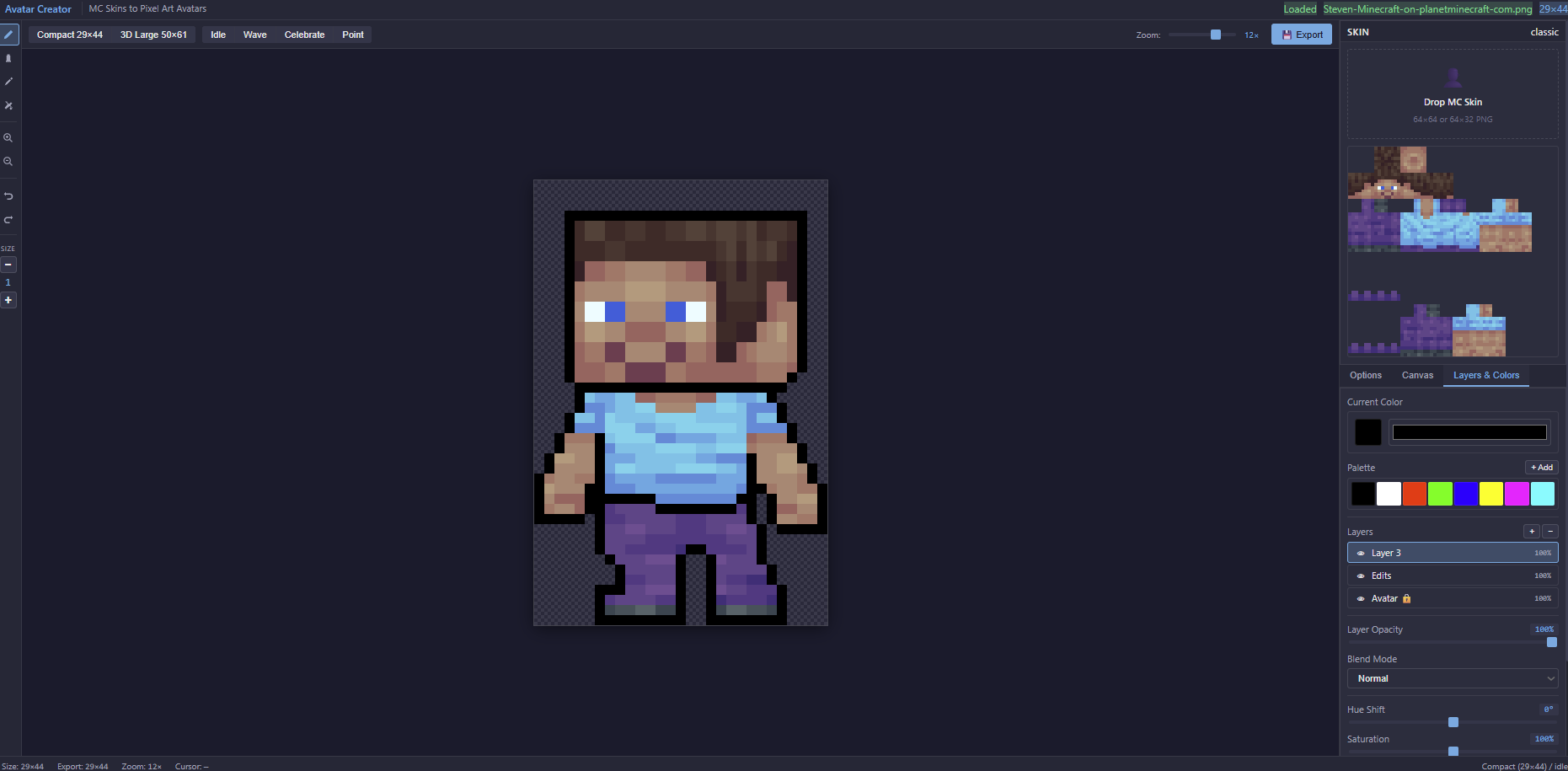
- View your avatar in different layouts: Compact (29×44) or 3D Large (50×61).
- Preview animated poses: Idle, Wave, Celebrate, and Point.
- Smart Arm Detection: Automatically detects standard (4px) vs. slim (3px) arm models, or allows manual overriding.
- Built-in Pixel Editor: Tweak your generated avatar right in the browser using the integrated toolbar (pencil, eraser, fill bucket, line/circle tools, and undo/redo capabilities).
- Customization Options: Easily toggle outlines, adjust export scale, and modify canvas layers and colors.
🚀 How to Use
- Upload your Skin: Drag and drop your Minecraft skin
.pngfile into the "Drop MC Skin" box on the top right panel. - Choose your Style: Use the top navigation bar to select between Compact or 3D Large views.
- Select a Pose: Click through the Idle, Wave, Celebrate, or Point buttons to change the character's stance.
- Tweak Options: In the right sidebar under the Options tab, you can:
- Adjust the Export Scale to make the image larger or smaller (values below 1 downscale the image).
- Change the Arm Model (defaults to Auto-detect).
- Toggle the Show Outline feature and change the outline hex color.
- Edit (Optional): Use the drawing tools on the left toolbar to make any pixel-perfect adjustments to the generated avatar.
- Export: Click Export PNG at the bottom right to download your avatar, or click Copy to copy it directly to your clipboard.
🛠️ Interface Overview
- Left Toolbar: Standard pixel art editing tools, brush size adjustments, and undo/redo buttons.
- Top Bar: Viewport controls (zoom), style selectors, and pose toggles.
- Center Canvas: Real-time preview of your generated pixel art avatar.
- Right Panel: * Skin Importer: Drag-and-drop zone.
- Tabs: Switch between Options, Canvas settings, and Layers & Colors.
- Export Actions: Buttons to download, copy, or reset the current project.
📝 Notes
- Make sure your uploaded files are standard Minecraft skin dimensions (64×64 or 64×32) for the generator to map the pixels correctly.
Reviews
There are no reviews yet.