
 Paper
Paper Purpur
 Velocity
Description
Vanity
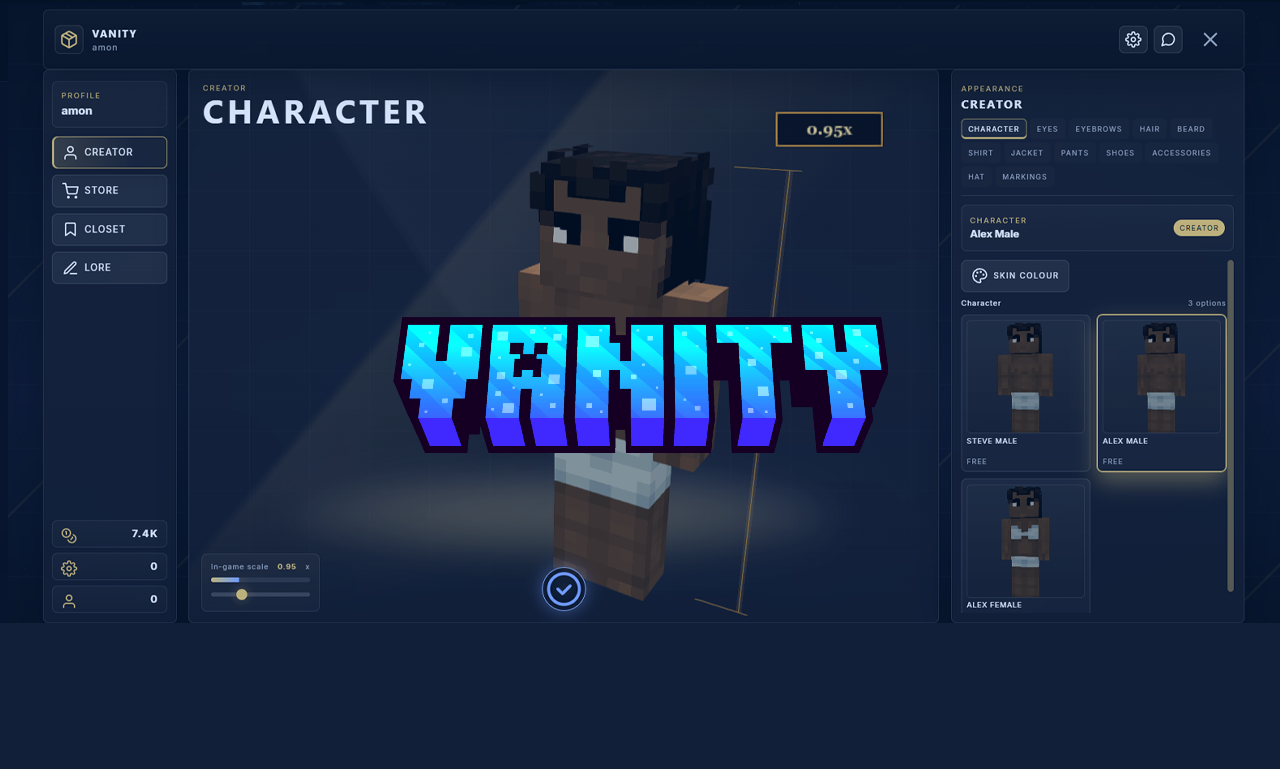
Vanity is a Paper/Purpur character creator plugin with a browser editor, store,
closet, lore, profile switching, themed UI shells, and MineSkin application.
Players open it with /vanity, build a look in the web UI, save outfits, buy
items, and apply the final skin back in-game.
What It Does
- Web character editor with no frontend build step
- Multiple character profiles per player
- Creator, Store, Closet, lore, and outfit application
- Admin-selectable themes and desktop layouts
- Separate character, customisation, skin-colour, and hair-colour token pools
- Vault economy with PlaceholderAPI + command fallback
- Permission-based or ownership-based item access
- Height scaling through Bukkit's player scale attribute
- Per-server colour palette restrictions
- Optional aging skin-tone overlays and web hooks
Requirements
- Paper/Purpur 1.21+
- Java 21+
- MineSkin API key if you want web saves to apply skins
- Optional: Vault, PlaceholderAPI, LuckPerms
Install
- Put
Vanity.jarinplugins/. - Start the server once.
- Edit
plugins/Vanity/config.yml. - Set
web.public-urlto the public domain or IP players will open. - Restart or run
/vanity reload. - Give players
vanity.use. - Run
/vanityin-game to confirm the editor link works.
If plugins/WardrobePanel/ exists, Vanity copies missing data from it intoplugins/Vanity/ on first boot. It does not delete the old folder.
First Configuration Pass
These are the settings to get right first:
web.public-url: required for valid clickable linksmineskin.api-key: required for applying finished looksthemes.default: active themelayout.default: active desktop layoutowned-items.enabled: whether store ownership gates creator itemspermissions.enabled: whether permission nodes gate itemseconomy.*: Vault / placeholder economy settingsscale.steps: explicit allowed height valuesbackground.*: site background source and dim/blur
Commands
/vanity
/vanity help
/vanity reload
/vanity theme [list|current|set <theme>|<theme>]
/vanity layout [list|current|set <layout>|<layout>]
/vanity token <amount> <player> [character|cust|skin|hair]
/vanity <player> lore
/vanity <player> lore set <text...>
/vanity <player> lore delete

/webchar ...        legacy compatibility command
theme and layout are admin-only. Players can no longer switch themes from
the website.
Permissions
vanity.use
vanity.admin
vanity.lore.others
vanity.bypass
vanity.skin.<skin-id>
vanity.skin.*
vanity.overlay.<category>.<overlay-id>
vanity.overlay.<category>.*
vanity.overlay.*
vanity.*
Legacy webchar.* and wardrobepanel.* checks still exist for older servers.
Folder Layout
plugins/Vanity/
  config.yml
  messages.yml
  palettes.yml
  shop.yml
  heights.yml
  overlays/
    hairs/
    eyes/
    eyebrows/
    beards/
    shirts/
    jackets/
    pants/
    shoes/
    accessories/
    hats/
    markings/
  skins/
  skin-tones/
  playerdata/
  profiles/
  web/
plugins/Vanity/web/ is the live website. Edit that folder on the server if
you want to customise HTML, CSS, JS, assets, or bundled themes.
Themes
Bundled themes:
modern-dark
modern-light
mmorpg
medieval
fantasy
sci-fi
obsidian
executive
ember
neon-noir
nordic
royal
terminal
Each bundled theme has its own:
themes/<theme>.cssassets/bg/<theme>/bg.pngassets/cursor/<theme>/default.pngassets/cursor/<theme>/active.pngassets/cursor/<theme>/drag.png- icon pack / font mapping in
web/js/lib/themeAssets.js
Change the active theme:
/vanity theme list
/vanity theme current
/vanity theme sci-fi
Or edit config.yml:
themes:
  default: sci-fi
  allow-player-switch: false
Layouts
Bundled admin-selectable desktop layouts:
command
showcase
atelier
split
compact
catalog
Change the active layout:
/vanity layout list
/vanity layout current
/vanity layout showcase
Or edit config.yml:
layout:
  default: showcase
Backgrounds
Global background config lives in config.yml:
background:
  type: room3d   # static | gif | video | room3d
  source: ""     # path under web/assets/ when using static/gif/video
  blur: 0
  dim: 0.3
Theme-specific background images live under:
plugins/Vanity/web/assets/bg/<theme>/bg.pngSwap those files when you want different per-theme stage art.
Viewer Lighting
Main preview lighting is server-configured:
viewer-lighting:
  enabled: true
  mode: studio     # studio | uniform
  intensity: 1.0
  azimuth: 35.0
  elevation: 55.0
  ambient: 0.58
exposure: 1.48studiokeeps directional lightinguniformflattens the light for cleaner colour checking
The website lighting button edits the preview values for that session. The
configured defaults still come from config.yml.
Categories And Tabs
The creator tab order is driven by config.yml:
categories:
  order:
    - base
    - eyes
    - eyebrows
    - hairs
    - beards
    - shirts
    - jackets
    - pants
    - shoes
    - accessories
    - hats
    - markings
Labels are also configurable there.
Adding Base Skins
Base skins live in:
plugins/Vanity/skins/Typical ids follow the shipped model/gender variants:
base-steve-malebase-alex-malebase-alex-female
If you add or remove base skins, run:
/vanity reloadAdding Overlays
Overlay PNGs live in:
plugins/Vanity/overlays/<category>/Supported categories:
hairs
eyes
eyebrows
beards
shirts
jackets
pants
shoes
accessories
hats
markings
Naming matters because Vanity filters by gender/model:
hairs,eyes,eyebrows,pants,shoes,hats,markings- use
male-...,female-..., orany-... beards- use
male-...orany-... shirts,jackets,accessories- use
steve-male-...,alex-male-...,female-..., orany-...
Examples:
plugins/Vanity/overlays/hairs/male-curly.png
plugins/Vanity/overlays/eyebrows/any-clean_brows.png
plugins/Vanity/overlays/shirts/steve-male-basic_tee.png
plugins/Vanity/overlays/jackets/female-cropped_jacket.png
After changing overlays, run /vanity reload so Vanity rescans and regeneratesweb/assets/manifest.json.
Shop And Ownership
shop.yml controls store pricing. owned-items in config.yml controls
whether creator access depends on ownership.
Example ownership setup:
owned-items:
  enabled: true
  starter-categories:
    - eyes
    - eyebrows
    - hairs
    - beards
    - base
  store-categories:
    - shirts
    - pants
    - jackets
    - shoes
    - accessories
    - hats
Example shop defaults:
pricing:
  defaults:
    hairs: 0
    eyebrows: 0
    beards: 0
    eyes: 0
    shirts: 200
    jackets: 350
Vanity can auto-generate shop.yml entries from discovered overlays without
overwriting existing manual edits.
Economy
Vault is preferred. PlaceholderAPI + console commands are the fallback.
economy:
  use-vault: true
  use-placeholder: true
  currency-name: Coins
  placeholder: "%vault_eco_balance%"
  withdraw-command: "eco take {player} {amount}"
  deposit-command: "eco give {player} {amount}"
Tokens
There are four separate token pools:
character: extra profile creation slotscust: general customisation changes like eye colour or heightskin: skin-colour changeshair: hair/beard/eyebrow colour changes
Admin grant examples:
/vanity token 1 PlayerName character
/vanity token 5 PlayerName cust
/vanity token 2 PlayerName skin
/vanity token 2 PlayerName hair
Config:
customisation-tokens:
  enabled: true
  free-per-profile: 1

character-tokens:
  enabled: true
  free-slots: 1
Colour Palettes
Restrict colours in palettes.yml. Vanity enforces these rules in both the web
UI and the server API.
Categories include:
skinhaireyesshirtspantsjacketsshoesaccessorieshats
Example:
categories:
  skin:
    allowed-hex:
      - "#f5d5b8"
      - "#d4a373"
    allowed-hue-range: [0, 50]
    allowed-saturation-range: [10, 70]
    allowed-lightness-range: [15, 90]
Scales / Heights
Preferred setup is explicit values in config.yml:
scale:
  steps: [0.85, 0.90, 0.95, 1.00, 1.05, 1.10, 1.15, 1.20]
The website slider snaps to these values, and the server snaps incoming changes
again before applying the player scale attribute in-game.
Aging System
The system is scaffolded and disabled by default.
Enable it:
aging:
  enabled: true
  tone-folder: skin-tones
  tick-interval-minutes: 60
  age-options: [child, teen, adult, elder]
  hair-grey-at-age: elder
Then place tone overlays in:
plugins/Vanity/skin-tones/File format:
<tone>_age<NN>.pngExamples:
fair_age15.png
fair_age25.png
fair_age40.png
Profile Switch Behaviour
These settings control what changes when a player switches profile in the web
UI:
profile-switch:
  inventory: true
  height: true
  permissions: false
  clear-potion-effects: false
  reset-hunger: false
  reset-health: false
If permissions: true, Vanity expects LuckPerms when applying profile group
changes.
Lore
Players can write lore per profile in the website. In-game:
/vanity <player> lore
/vanity <player> lore set <text...>
/vanity <player> lore delete
Web Hooks
Vanity can run console commands from website events:
outfit-applyoutfit-saveprofile-createprofile-selectprofile-deleteitem-purchaselore-set
Config:
web-hooks:
  enabled: true
  events:
    outfit-apply: []
    outfit-save: []
    profile-create: []
    profile-select: []
    profile-delete: []
    item-purchase: []
    lore-set: []
Editing The Website
Live website files extract to:
plugins/Vanity/web/Most useful files:
index.html: shell markupstyle.css: shared layout and common component stylingthemes/*.css: per-theme visualsjs/icons.js: icon packsjs/lib/themeAssets.js: theme -> bg/cursor/icon/font bindingjs/render/viewer3d.js: player viewer and lightingjs/render/itemPreview.js: store/closet card render framingjs/ui/*.js: editor, store, closet, settings, and profile UI
There is no web build pipeline. Edit the extracted files directly, refresh the
page, and test.
Saved Outfits / Closet
Players can:
- save outfits
- equip outfits
- rename outfits
- delete outfits
- edit a saved preset by loading it into the creator and saving back over it
The edit flow now works from Closet into Creator instead of editing inside the
modal.
 Folia
Folia
A M O N (verified owner) –
Testing the review system