
 Folia
Folia Paper
Paper Purpur
 Velocity
Description
Titlescreen
Premium Minecraft ESC Menu Studio
Titlescreen is a premium Paper plugin and browser-based design toolkit for creating polished, pixel-perfect Minecraft Java pause menus.
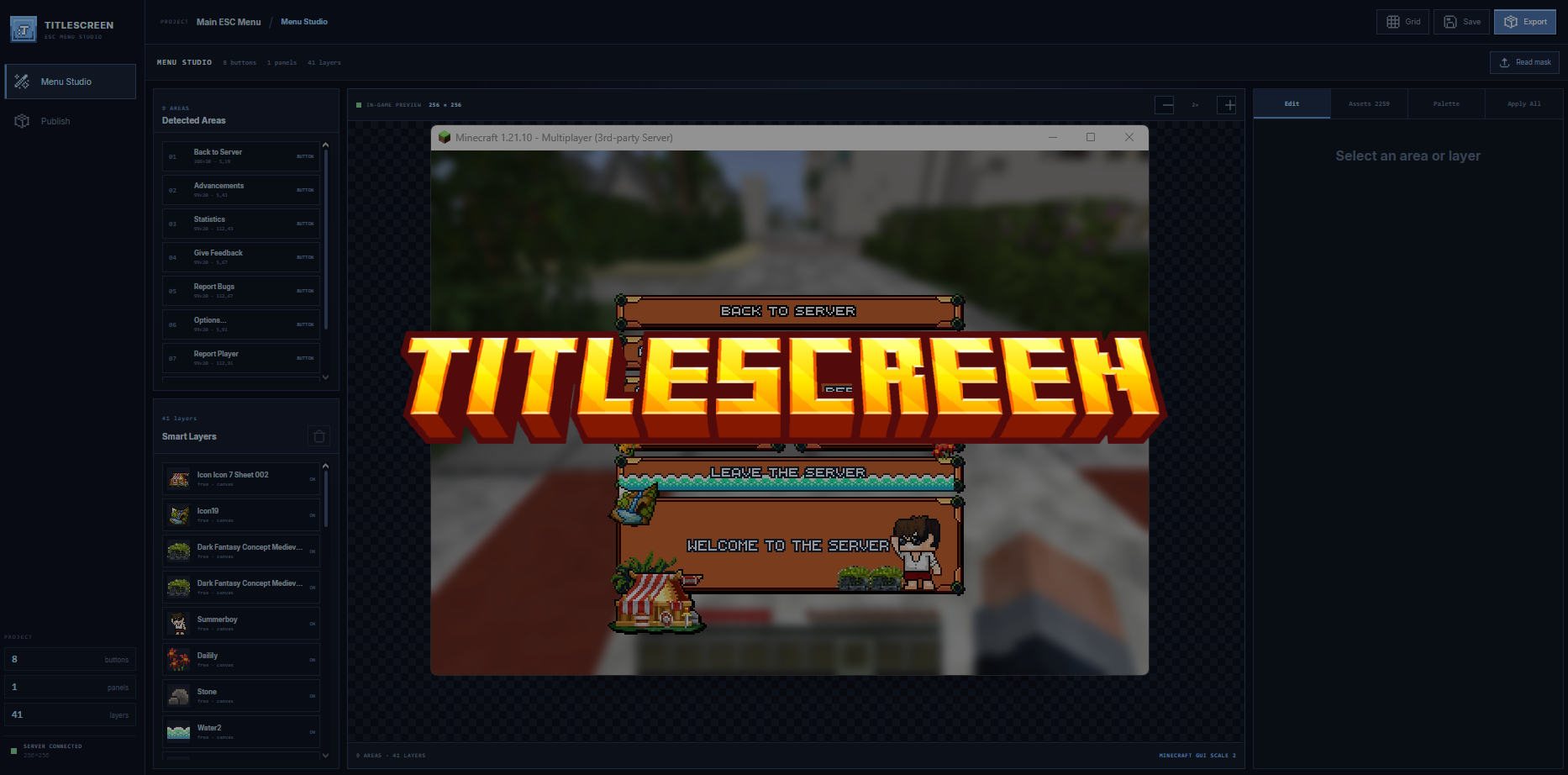
It provides server owners with a complete visual workflow for designing an ESC menu, styling every button, adding custom text and decorative artwork, previewing the finished composition over an in-game screenshot, and preparing the required ItemsAdder or Nexo resource-pack files.
No pixel-art experience or manual texture assembly is required.
Designed for exact Minecraft rendering
Titlescreen works from native Minecraft-sized artwork and whole-pixel coordinates. Image smoothing is disabled throughout the editor, button pieces are tiled instead of blurred or stretched, and text is positioned against the exact dimensions of each detected menu area.
The result is a menu designed to remain crisp and correctly aligned in-game.
Core features
- Pixel-precise Minecraft Java ESC and pause-menu creation.
- Self-hosted browser studio provided by the plugin.
- ItemsAdder and Nexo export support.
- Automatic detection of button and panel areas from green layout masks.
- Exact preservation of detected positions, dimensions, rows, columns, and spacing.
- Seamless button construction using native start, middle, and end pieces.
- Support for standard buttons and large information panels.
- In-game composition preview using Minecraft screenshots.
- One unified design across the entire menu or individual styling per button.
- Global and individual font controls.
- Direct text editing on the canvas.
- Multi-line text support for buttons and large panels.
- Character- and word-level RGBA text colouring.
- Saved colour palettes for consistent menu designs.
- Text outlines, shadows, positioning, spacing, brightness, contrast, and saturation.
- Multiple movable shine effects with colour, opacity, brightness, contrast, and saturation controls.
- Unified shine opacity and styling when a consistent result is required.
- Smart frames, borders, corners, sockets, banners, and minibanners.
- Free-positioned decorative assets with drag controls.
- Reorderable layers with visibility, duplication, removal, opacity, and colour adjustments.
- Apply-to-all controls for button surfaces, fonts, colours, effects, shines, frames, corners, sockets, and complete setups.
- Undo, redo, copy, cut, and paste support.
- Custom PNG decorations, masks, button styles, TrueType fonts, and Minecraft bitmap fonts.
How Titlescreen works
1. Layout detection
A green layout image defines the position and size of every part of the menu. Titlescreen detects each connected green area and separates standard button regions from larger content sections.
Every region keeps its original pixel coordinates and spacing.
2. Automatic button construction
Detected button areas are filled using the selected button style. Titlescreen keeps the left and right ends intact while repeating the middle segment seamlessly across the required width.
Large bottom panels can follow the same visual style as the buttons or use their own individual design.
3. Direct visual editing
Buttons and panels can be selected directly from the work area. Text, fonts, colours, effects, and decorative layers can be adjusted without manually editing resource-pack files.
Changes may be applied to one selected area, every button, or the entire composition.
4. Smart decorative layers
Titlescreen understands several asset placement modes:
- Frames and borders fit around the selected button or panel.
- Corners are automatically placed on the correct four corners.
- Sockets attach to chosen corners with adjustable padding.
- Banners and minibanners preserve their end caps while repeating the detected middle section.
- Free layers can be dragged anywhere on the canvas and moved through the layer order.
5. Preview and export
The finished composition is displayed over an in-game background before export. Titlescreen then prepares the textures, font data, language entries, and provider-specific files used by the selected integration.
The original Minecraft pause-menu buttons retain their normal actions and click areas. Titlescreen changes their visual presentation through the resource pack rather than replacing the pause screen with an inventory menu.
Included design library
Titlescreen includes a prepared library of 2,259 pixel-art design elements across 22 categories.
The library contains:
- Banners and minibanners
- Borders and frames
- Cards and circles
- Characters
- City artwork
- Containers
- Corners and sockets
- Crops
- Energy decorations
- Japanese-themed artwork
- Medieval buildings, objects, and decorations
- General objects
- Pirate artwork
- Plants and flowers
- Potions
- RPG icons and props
- Summer artwork
- Tiles and environmental pieces
The latest library expansion adds Characters, City, Crops, Medieval, Objects, Pirate, and Tiles, alongside a larger RPG collection. Assets originating from sprite sheets are prepared as individual transparent elements for convenient use inside the studio. Backgrounds have been removed from applicable artwork, including the Medieval collection.
Customisation
Titlescreen is not limited to the included library. Customers can import their own:
- Transparent PNG decorations
- Button start, middle, and end sets
- Green layout masks
- TrueType fonts
- Minecraft-compatible bitmap fonts
Imported artwork is placed at its native size and can be managed through the same layer and styling controls as the included collection.
Compatibility and requirements
- Minecraft Java Edition
- Paper server software
- Java 21
- ItemsAdder, Nexo, or both for the corresponding export workflow
- A modern web browser for Menu Studio
ItemsAdder and Nexo are separate products and are not included with Titlescreen. A legitimate installation of the chosen provider is required.
Minecraft client updates can change pause-screen layouts or font rendering. Menu designs should be checked on every Minecraft version and GUI scale supported by the server.
Customer setup
- Place
Titlescreen.jarin the server'spluginsfolder. - Start or restart the Paper server.
- Run
/titlescreen webto view the Menu Studio address. - Open Menu Studio and create the ESC menu.
- Select ItemsAdder, Nexo, or both from the Publish section.
- Export the project and refresh the selected resource-pack provider.
- Reconnect with the updated resource pack and review the menu in-game.
Remote access to Menu Studio should be protected by the configured API token and a secure authenticated reverse proxy.
Commands
/titlescreen web— displays the Menu Studio address./titlescreen export— exports the current project./titlescreen reload— reloads the plugin configuration and saved project.
Administrative access is protected by the titlescreen.admin permission. Separate web, export, and reload permissions are also available.
Premium product and asset disclaimer
Customers do not pay for any artwork or asset included with, displayed by, or made available through Titlescreen. The purchase price is solely for the Titlescreen plugin, Menu Studio toolkit, rendering and export functionality, provider integrations, workflow, and website tooling.
The included asset library is provided only to help a licensed customer create an ESC or pause menu for their own Minecraft server.
Purchasing Titlescreen does not transfer ownership of any included artwork and does not grant a standalone asset licence.
Permitted use
Included assets may be used as part of a finished ESC or pause-menu composition running on the licensed customer's own Minecraft server.
Screenshots and videos showing that server and its finished menu may be used to promote the server, provided the underlying assets are not separately distributed.
Prohibited use
Customers may not:
- use Titlescreen or its included library to create assets, menus, templates, asset packs, sprites, graphics, or derivative collections for sale;
- sell menu designs produced with the included asset library;
- sell, resell, sublicense, share, redistribute, repackage, extract, or upload included assets;
- distribute included assets in original, recoloured, edited, cropped, combined, or otherwise modified form;
- offer the included assets or generated compositions as an asset-creation service;
- claim ownership, authorship, or exclusive rights over included third-party artwork;
- distribute projects or exports for the purpose of giving another person access to the included artwork; or
- use the product as a tool for producing commercial asset packs or artwork for other servers.
The assets exist to make it easier for customers to create their own server's ESC menu. They are not products that the customer may redistribute or sell.
Third-party rights
Artwork, fonts, Minecraft material, and other third-party content remain subject to the rights and licence terms of their respective creators. The pricing disclaimer above does not replace copyright permission or expand any third-party licence.
Customers are responsible for ensuring that custom files uploaded to Titlescreen are files they are permitted to use. Uploading artwork does not create or transfer ownership rights.
Titlescreen is not affiliated with or endorsed by Mojang Studios, Microsoft, Paper, ItemsAdder, Nexo, or Blockbench. Product names are referenced only to describe compatibility.




m_josue (verified owner) –
It delivers on everything it promises, has a modern interface, and is inexpensive—I recommend it 100%.
zephyr_33811 (verified owner) –
I really liked the plugin, I recommend it 👍.