
 Paper
Paper Purpur
Description
ClothesPlus Free 4.2.1
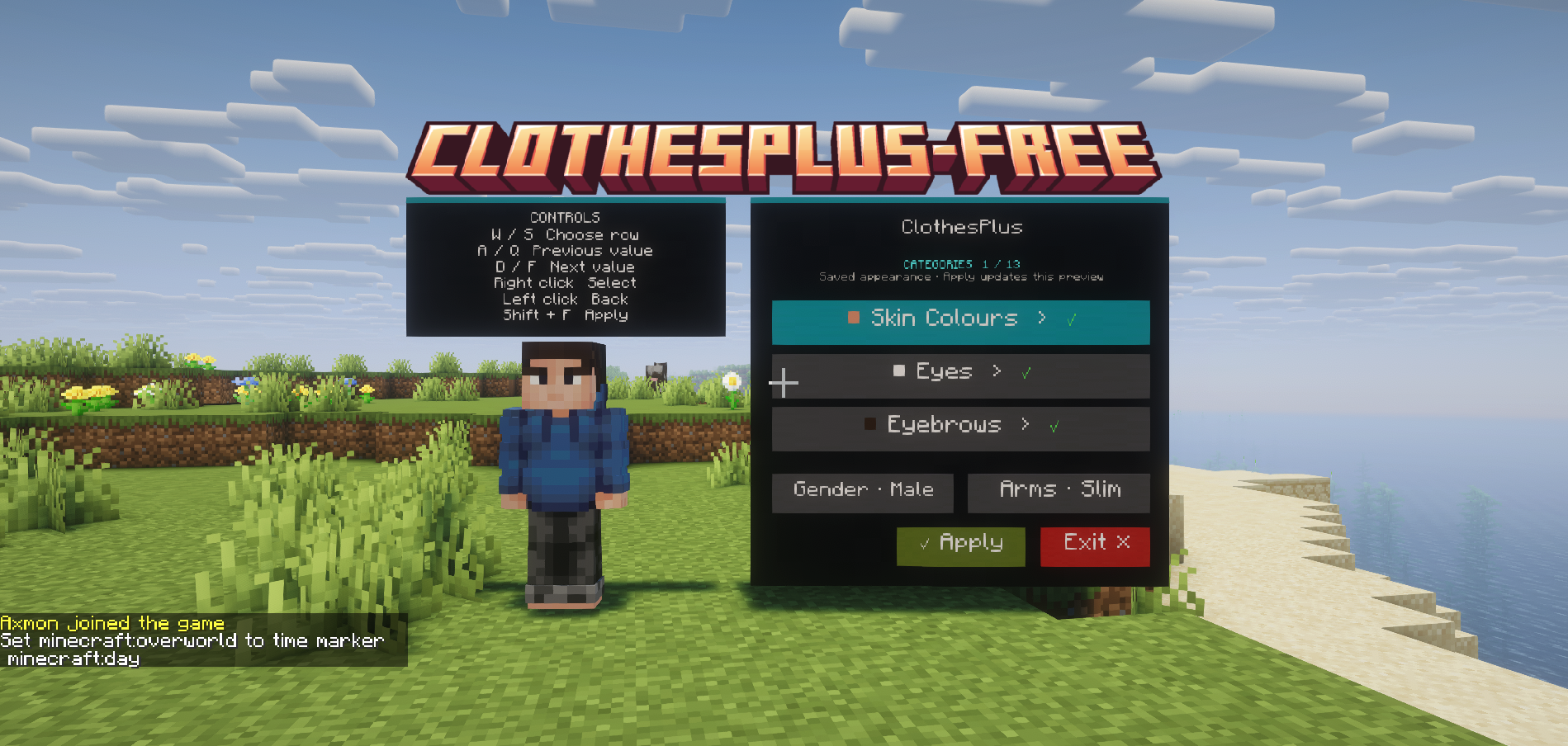
A complete in-game character and clothing creator for Paper servers. Players choose a category, browse styles and colours, and press Apply to save. An optional private NPC shows their saved appearance. A fixed camera, visible instructions and keyboard navigation guide each choice.
Free includes the creator, skin composition, a supplied overlay library, permissions, translations, saved appearances, an in-game layout editor, and the shared ClothesPlus developer API.
Install
- Install Paper 1.21.4+, Java 21 for the 1.21.4 target, and the standard PacketEvents 2.13.0 Spigot server plugin (the normal release, not the
no-advvariant). Use the Java version required by your Paper release. This build targets Paper 1.21.4; later versions still need client validation on your server. Spigot and Folia are not supported. - Put
ClothesPlus-Free-4.2.1.jarinplugins/, then start the server. Install one ClothesPlus edition at a time. The API JAR is a developer dependency, not another plugin to install. - In
plugins/ClothesPlusFree/config.yml, setskins.mineskin-api-keyusing a key from the MineSkin account manager. Applying a newly composed skin needs a signed texture. Browsing choices and viewing an already saved appearance do not create signing requests. - Restart after changing runtime configuration. Join and use
/cpf open./cpf statusshows setup information for administrators. Setcreator.preview.enabled: falseto use the panel without the saved-appearance NPC.
The plugin automatically installs its Base_Skin/ templates, 4,880 bundled overlays, language files, and creator layout.
The creator
The first page shows a scrollable list of categories. Selecting one opens a detail page with separate Style and Colour rows, Clear/Reset, and Back. Selected colours appear as swatches sampled from the actual texture. Gender and arm width have their own rows; Apply and Exit stay inside the footer.
| Default control | Action |
|---|---|
| A / D or Q / F | Previous / next option on the focused row |
| Shift+F | Apply the current draft |
| W / S | Move focus up / down |
| Right click | Select the focused category or activate the focused control |
| Left click | Back to Categories |
| Apply | Save the selected layers, gender and arm width |
Exit or /cpf close |
Close and discard unapplied changes |
A separate display card above the avatar shows the bindings. Clicks work with an empty hand through a private interaction target. PacketEvents uses a fixed non-player camera and a stationary mount, hiding the hotbar and suppressing movement while W/S stays available for navigation. Held items are hidden only on that client and resynchronized on exit; the actual inventory is never changed.
The panel shows its bindings. These names refer to Minecraft's default key assignments: Q is Drop and F is Swap Hands, so players who rebind those actions should use their own assigned keys.
The labels, selected styles and colour swatches update as you browse. The NPC continues showing the saved appearance until Apply succeeds; unsaved draft changes are not rendered on it. Apply has a visible three-second cooldown and a saving indicator. Browsing never uploads to MineSkin; matching image/model signatures are reused, and uncached signing requests are serialized with rate-limit backoff.
Hair, eyebrows and beards share matching colour folders. Changing the colour preserves each selected feature's style and does not equip a feature that was cleared. Gender and classic/slim arm choices adapt selections to compatible variants. Missing custom variants are handled as described in the skin system guide.
Apply keeps the editor camera stable: it saves the outfit and updates the NPC immediately, then refreshes your real player skin after you exit. Wearing a jacket automatically hides the shirt's outer torso and sleeves; removing the jacket restores them. Your original shirt PNG and selection stay intact.
Full controls and layout editing: creator guide.
Character mode and Base Skin mode
| Setting | Behavior |
|---|---|
skins.base-skin.enabled: false |
Full character creation using the supplied clean body templates: skin tones, eyes, hair, eyebrows, beards and clothing. Gender and arm controls are available. |
skins.base-skin.enabled: true |
Clothing-only creation. Body categories are hidden and rejected, including through API overlay requests. An empty base path uses the player's original skin; a configured PNG uses your mannequin. |
The creator starts every composition from the original/configured base, never from the previously applied outfit. skins.clear-outer-layer clears old outer-layer pixels before drawing the new clothes. It preserves inner-layer UVs. In clothing-only mode, set both this option and skins.base-skin.clear-outer-layer to false if you deliberately want to keep the original outer layer.
skins.base-png, skins.creator-base-paths, and skins.base-skin.gender-paths support server-specific templates. Legacy base_skin / Base_Skin boolean settings are recognized. See modes, arm conversion and folder metadata before adding your own templates.
Add and organize overlays
plugins/ClothesPlusFree/
  config.yml
  creator.yml
  lang/en.yml
  lang/tr.yml
  Base_Skin/
  overlays/
    hairs/human_race/steve-male/brown/Male_7.png
    eyebrows/human_race/steve-male/brown/Male_2.png
    beards/human_race/steve-male/brown/Male_1.png
    shirts/steve-male/hoodies/Blue_Hoodie.png
    shirts/shared/Server_Shirt.png
  players/
  cache/
Use transparent 64×64 or legacy 64×32 Minecraft skin PNGs, up to 1 MiB each. These are skin layers, not cropped inventory icons. Category order in overlays.categories determines composition order. Nested profile/model and colour folders supply filtering and palette metadata; the catalogue supports up to 8,192 entries and 24 categories.
Run /cpf reload after editing overlays, the layout or language files. It validates the catalogue and layout before replacing them and closes active creator sessions on success. Runtime config.yml settings require a full restart. Malformed PNGs are skipped with their path in the server log; invalid YAML is rejected.
Commands and permissions
/clothesfree and /cpf are aliases. /cpf help shows permission-aware clickable suggestions.
| Command | Permission suffix | Purpose | ||
|---|---|---|---|---|
open [category] |
use |
Open Categories or a specific category | ||
preview |
preview |
Refresh the private NPC from your saved appearance | ||
close |
Always available to exit | Close the creator | ||
list [category] |
use |
List allowed categories and overlay IDs | ||
wear <id> |
apply |
Apply a layer in its category | ||
remove <category> / clear |
apply |
Remove a layer / all selected layers | ||
| `gender <male\ | female\ | unspecified>` | gender + apply |
Change the open draft, or apply the profile when closed |
| `arms <classic\ | slim>` | arms + apply |
Change the open draft, or apply arm width when closed | |
edit [help] |
edit |
Edit and save creator layouts | ||
reload |
reload |
Reload content, layout and language | ||
status |
status |
Inspect version and catalogue status |
All permission names start with clothesplus.free.. Player features default to allowed. edit, reload, status, and the admin grouping default to operators. admin grants those three administrative permissions. Player commands also require use; revoking a permission during a session cannot bypass Apply checks.
For content restrictions, explicitly deny clothesplus.free.category.hairs or an overlay node such as clothesplus.free.overlay.hairs.human_race.steve-male.brown.male_7. Overlay node IDs use lowercase and replace separators/punctuation with dots. Use /cpf list for exact catalogue IDs.
For an unlock-based server, enable permissions.require-category and/or permissions.require-overlay, then grant the appropriate nodes. clothesplus.free.category.* and clothesplus.free.overlay.* grant each whole group; explicit item denials take precedence. API mutations are trusted integration actions, so calling plugins must enforce their own access and purchase rules.
Language and quiet chat
Set messages.enabled: false to silence all plugin chat, including help, command responses and creator notifications. The on-screen creator remains visible and usable.
Edit lang/en.yml, choose the supplied Turkish UI with messages.language: tr, or copy English to lang/<language>.yml and select that name. Missing translated keys fall back to English. & colour codes and documented {placeholders} are supported. Blank chat entries suppress individual messages, and messages.disabled-keys can mute selected keys. messages.prefix adds an optional chat prefix.
Creator labels are configured in creator.yml; creator.button.<button-id> entries in a language file override them for that language. Category names and keyboard hints are also translatable. /cpf reload reads language edits; changing the selected language in runtime configuration requires a restart.
Updating an existing server
Stop the server, replace the JAR, and start it again. There is no requirement to delete your plugin folder. This release uses config version 7, language version 3 and creator layout version 3.
- Config and language upgrades compare old shipped defaults, installed values and new defaults. Unchanged defaults update; custom values and deliberate deletions stay intact. Changed files are backed up under
backup/before replacement. Invalid YAML is never replaced by a generated blank file. - The untouched old starter layout upgrades to the new two-page design as a whole. Custom button layouts stay intact;
creator.latest.ymloffers the new design for an administrator to adopt deliberately. - Overlay and base-template SHA-256 manifests update untouched bundled artwork and add newly shipped assets. Edited files and deliberate deletions are retained; replaced defaults are backed up. A server predating manifests keeps unknown existing artwork untouched on its first migration.
- Restarting the same version does not rewrite these files or repopulate deleted artwork.
.defaults/and the asset manifests record shipped versions; keep them with server backups.
Free and Premium
Free provides the complete category, clothing, profile and Apply workflow, with an optional NPC displaying the saved appearance. Its public API contract remains compatible with integrations that support either edition.
Premium remains the broader product: its Studio/browser workflows, shops, sewing, richer wardrobe/barber systems, artwork publishing tools, expanded model providers, animations and cinematic systems are outside Free's scope.
 Folia
Folia Velocity
Reviews
There are no reviews yet.